How to get a quick summary of the web page you're on
Last updated October 22, 2026 · 4 min read
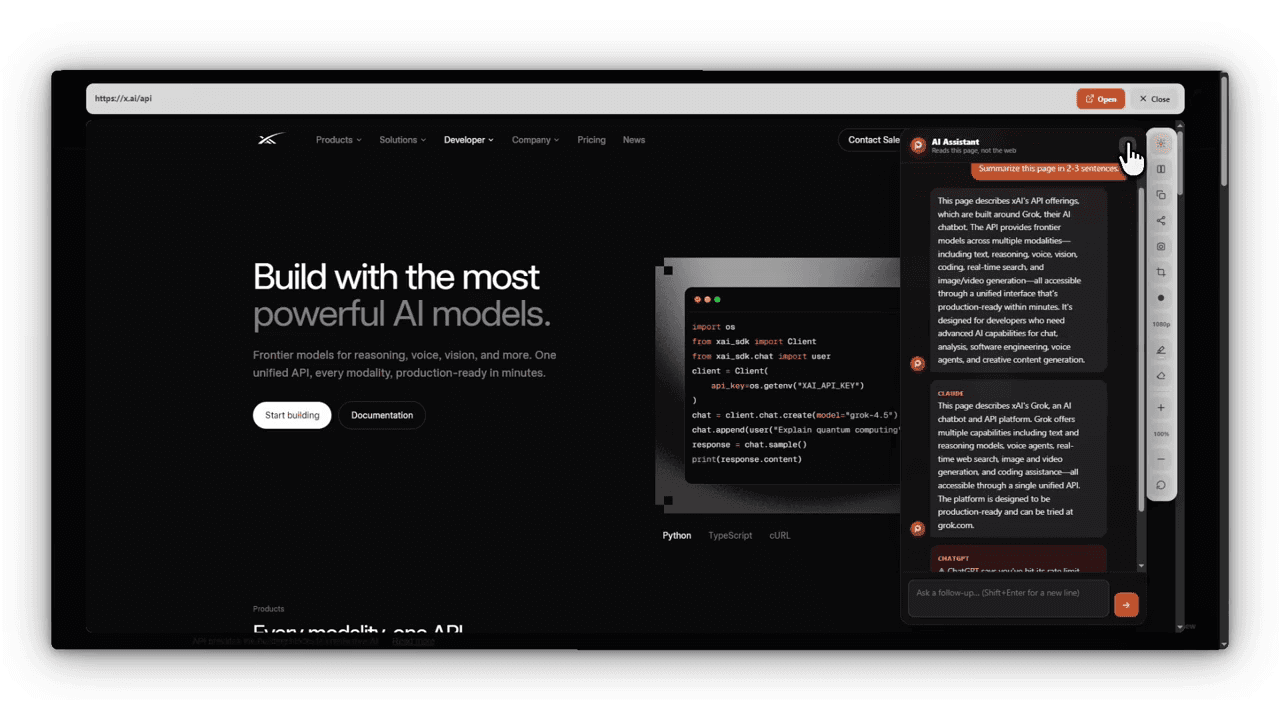
Open the page in Peekly and ask for a summary. The panel answers right next to the page, so you can check the summary against the original instead of trusting it blind. You can also ask follow-up questions about the same page.
Two ways to get the gist
- Reading mode, no setup needed: strips the page down to its text and headings, with the reading time shown, so you can skim the structure in a few seconds.
- AI summary: summarize the page or ask a question about it. It uses your own API key for ChatGPT, Claude, Gemini or Groq. Gemini and Groq both offer free keys.
Set it up once
- Open Peekly’s Settings and go to AI Assistant.
- Pick a provider and paste your API key. It stays in your browser and is never synced or sent to Peekly.
- On any page or preview, open the panel and choose Summarize.
Summaries in your language
Ask in any language and the answer comes back in that language, even when the page is in another one. Peekly can also translate the page itself.
Questions people ask
- How do I make a short summary of the current web page?
- Open the page in Peekly and choose Summarize in its panel. It uses your own API key for ChatGPT, Claude, Gemini or Groq; Gemini and Groq have free keys.
- Can I summarize a page without an AI key?
- Reading mode needs no key: it shows just the text and headings with the reading time, which is often enough to get the gist.