The best free browser extensions for students
Last updated October 24, 2026 · 4 min read
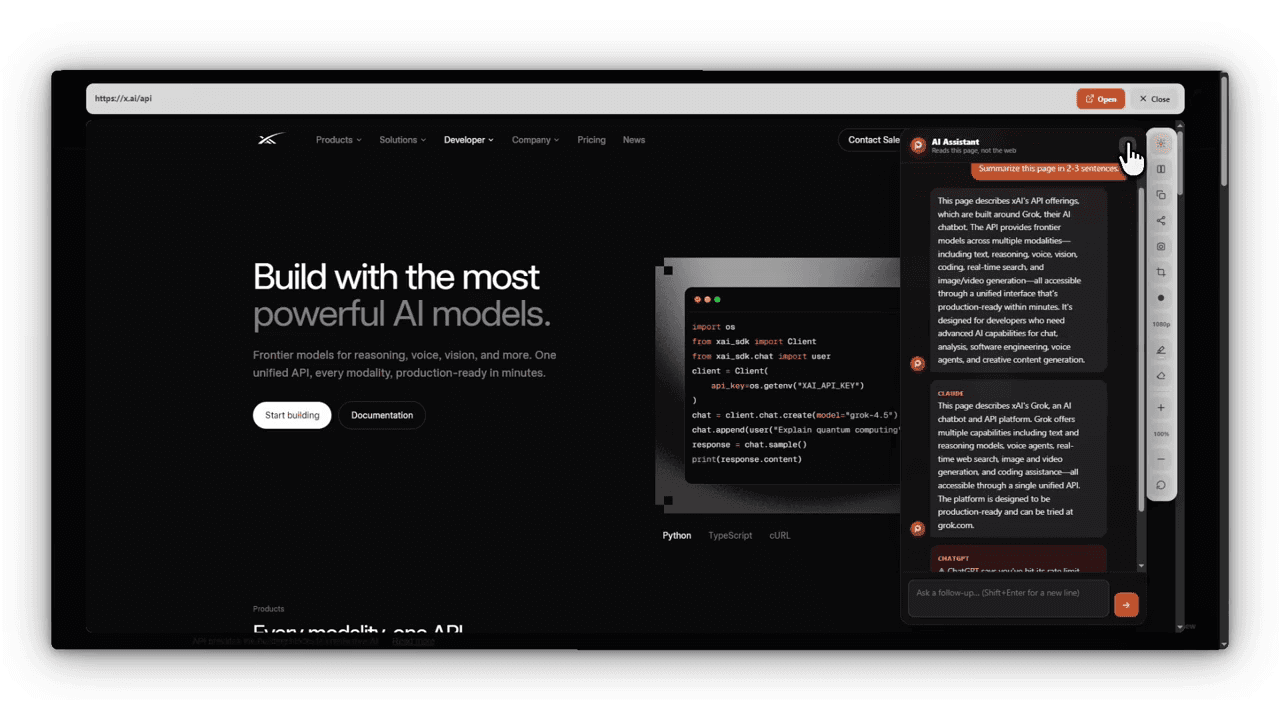
Research means opening a lot of sources to find the few worth reading. These free extensions cut down the clicking and keep your notes in one place.
Checking sources: Peekly
On a results page, Peekly shows a card under each result. Rest on any link to open the page over your search, read enough to decide, then use the arrows to move to the next source. Your list of results never moves, so you don’t lose your place.
Summarizing long pages
Peekly can also summarize a page with the AI model you pick. You add your own API key; Google Gemini and Groq both give free keys, so this costs nothing.
Citing: Zotero Connector
Zotero is free reference software. Its browser connector saves a paper or web page with one click and builds your bibliography in whichever citation style your course wants.
Grammar: LanguageTool
LanguageTool checks grammar and spelling as you write in the browser, in many languages, with a free plan.
Focus: a site blocker
A simple blocker like LeechBlock NG (free, open source) lets you block distracting sites during the hours you study.
Questions people ask
- What extensions help with research?
- A link previewer like Peekly to check sources without opening tabs, Zotero Connector to save and cite them, and LanguageTool for writing. All have free versions.
- Can I summarize articles for free?
- Yes. Peekly summarizes pages with your own AI key, and Google Gemini and Groq both offer free keys.